A few MB light, native-composition fast. A header-only, zero-dependency C++20 Windows UI framework built directly on Direct2D 1.1 + DirectComposition.
- No Qt packaging baggage, no Electron memory tax. A handful of headers;
#includeand go — application projects link no third-party libraries. - WinUI 3 / Fluent Design language. Acrylic / Mica, rounded corners, layered shadows, accent colour and motion for a native Windows 11 look.
- Embed native content.
HwndViewhosts WebView2, cameras, third-party controls and even out-of-process HWNDs inside the layout (cross-process, region-clipped, moves with the window).
👉 Download the release demo · Gitee Releases · Online API · 简体中文 · MIT
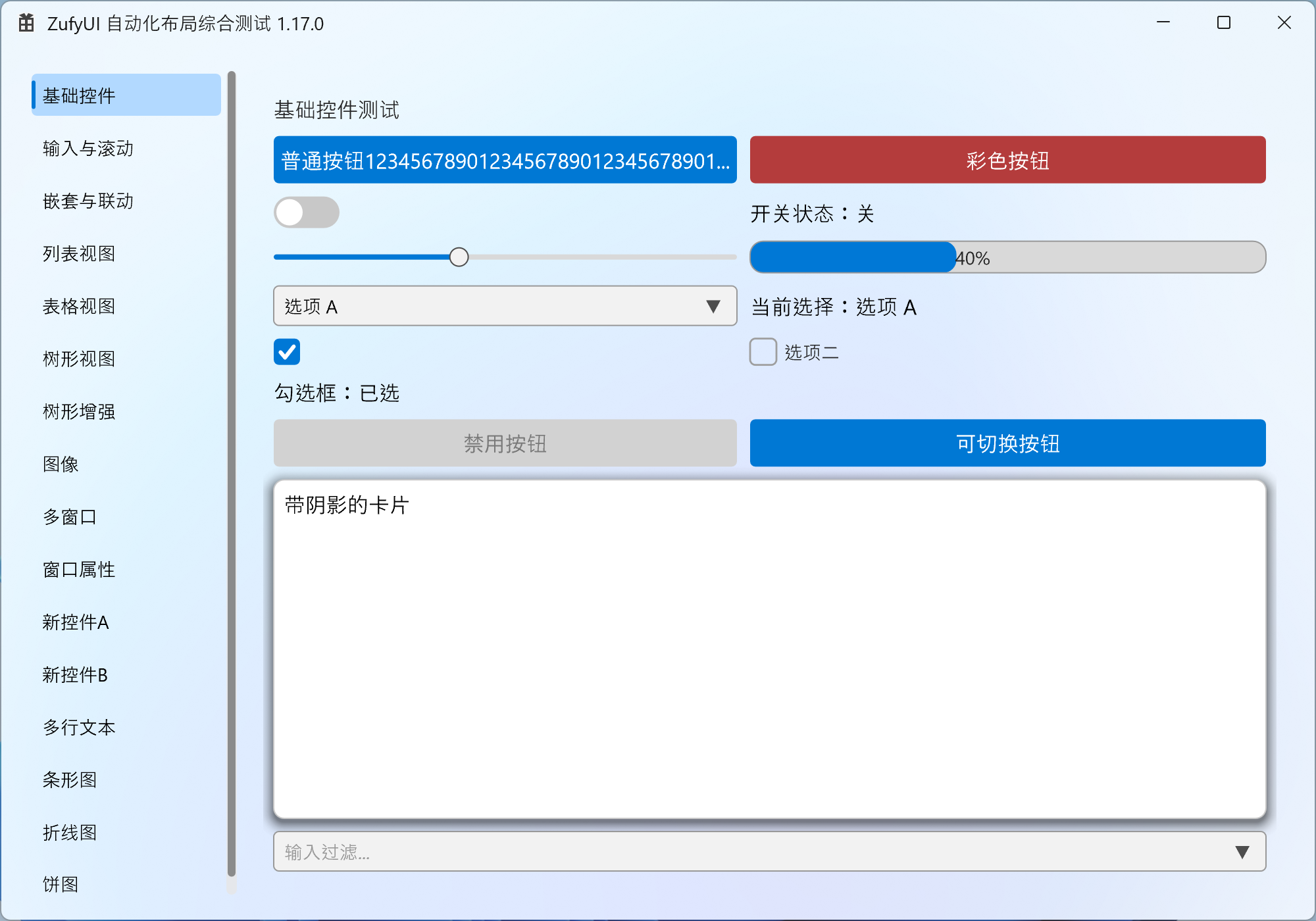
Quick start
Goal: get your first window on screen within 10 minutes and know which chapter to read next. Follow the steps below.
Step 0: setup (header-only, zero build config)
- Add the directory containing
ZufyUI.h,ZufyUIWidgets.h,ZDataViewer.h,ZufyUICharts.h,ZufyUIWindowTool.h,ZufyUIDragDrop.hto your include path; nothing to compile, no third-party deps. - All required system libs are auto-linked via
#pragma comment(lib, ...)(complete list under Requirements). - GUI entry point:
wWinMain+/SUBSYSTEM:WINDOWS. - If your environment dislikes BOM / non-ASCII sources, run the ASCII-only export and use the headers in
dist/ascii. - ⚠ Entry point pitfall: if you insist on
int main(), set/SUBSYSTEM:CONSOLE, or add#pragma comment(linker, "/SUBSYSTEM:WINDOWS /ENTRY:mainCRTStartup"), otherwise the linker won't find an entry point.
Step 1: minimal window + a button + a toggle
#include "ZufyUIWidgets.h"
using namespace ZufyUI;

int WINAPI wWinMain(HINSTANCE, HINSTANCE, LPWSTR, int) {
    Window win;
    if (!win.Create(1000, 700, L"ZufyUI Demo"))
        return 1;

    auto root = win.GetRootColumnBox();
    root->SetSpacing(10);

    auto row = std::make_shared<RowBox>();
    row->SetSpacing(10);

    auto btn = std::make_shared<Button>(L"Click me");
    btn->Connect(btn->Clicked, []() {
        MessageBoxW(nullptr, L"Hello ZufyUI!", L"Info", MB_OK);
    });

    auto toggle = std::make_shared<ToggleSwitch>(false);
    auto state = std::make_shared<Label>(L"Switch: off");
    toggle->Connect(toggle->Toggled, [state](bool on) {
        state->SetText(on ? L"Switch: on" : L"Switch: off");
    });

    row->AddChild(btn);
    row->AddChild(toggle);
    row->AddChild(state);
    root->AddChild(row);

    win.Run();
    return 0;
}
Key points (what each step does):
Window::Createcreates the window, initializes Direct2D, applies the background, and generates a default rootColumnBox(margin 20, spacing 10);- Create controls with
std::make_shared<T>()and attach them withAddChild; a parent owns its children viashared_ptr; - Bind events with
Connect(signal, slot); connections auto-disconnect when the receiver (control/window) is destroyed; useConnectWeakwhen the receiver needs weak lifetime; win.Run()enters the message loop; all windows/controls live on the same UI thread.- ⚠ Units: coordinates/sizes are DIP (not physical pixels); the framework handles DPI snapping, so you don't.
Result (that exact code above):
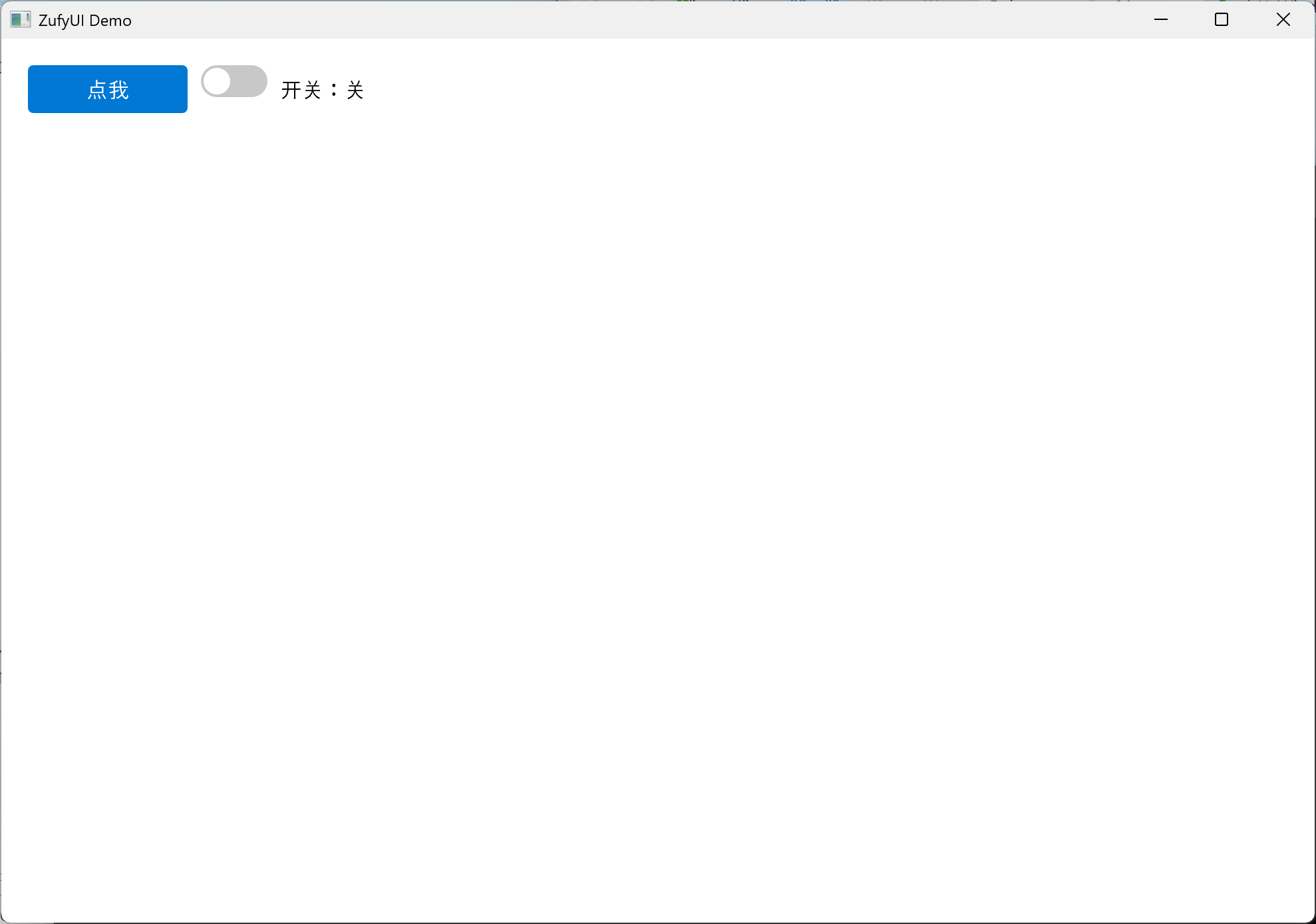
Steps 2 / 3: change the background, change the title bar
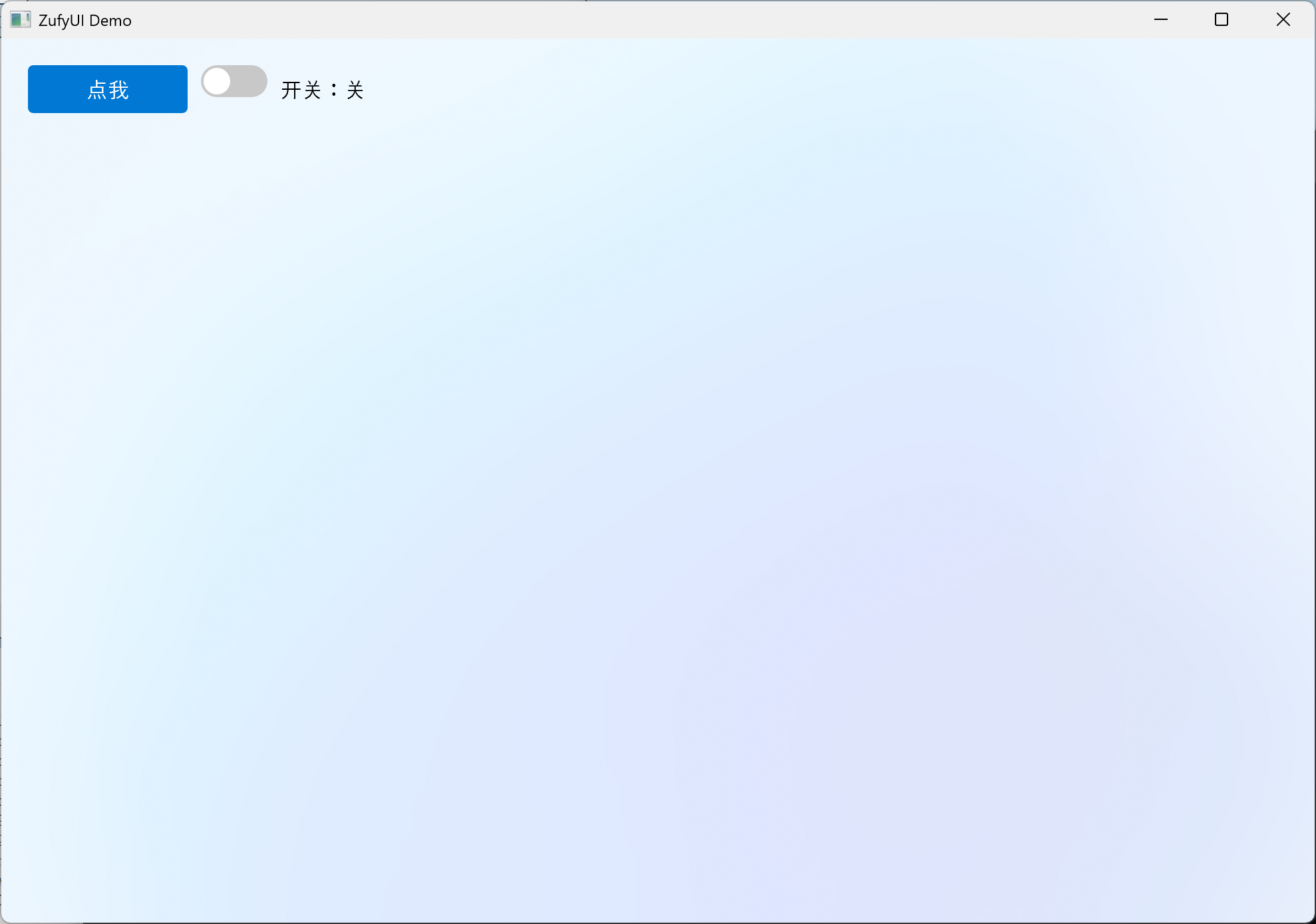
Step 2: change the background. Only three backdrop layers exist — None / Acrylic / Mica — with an ARGB tint composited on top:
win.SetBackdrop(Backdrop::Mica, 0x00000000); // Mica + fully transparent tint
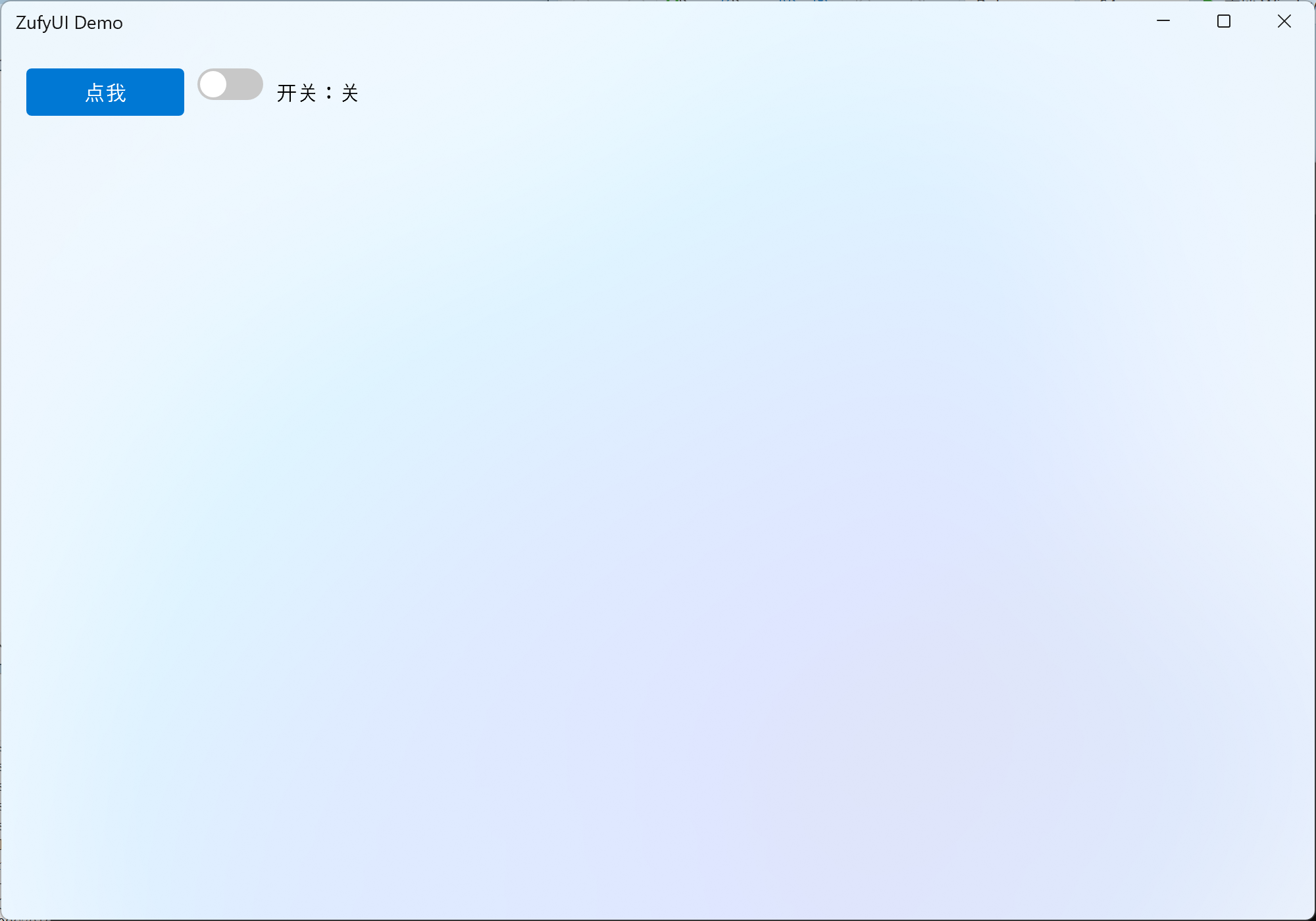
Step 3: a custom title bar. Swap the title bar (plus switch to Mica so it stands out):
#include "ZufyUIWindowTool.h"   // DefaultTitleBar lives here

auto bar = std::make_shared<DefaultTitleBar>();
win.SetCustomTitleBar(bar);
win.SetBackdrop(Backdrop::Mica, 0x00000000);   // also switch to Mica
Step 4: what to read next
- Layout & controls overview: API Reference · Layout / Basic controls
- Data UI (list / table / tree): the "Data views" chapter
- Charts: the "Charts" chapter (
BarChart/LineChart/PieChart) - Window extras (title bar / tray / system dialogs): the "Window extras" chapter
- Accessibility & debug/automation: the "Accessibility & Debug Channel" chapter
Three things to always remember
- DIP: all sizes/coordinates are DIP — no manual DPI math.
shared_ptr= ownership: own controls withmake_shared, attach withAddChild; dropping the onlyshared_ptrdestroys it.- Entry point / subsystem:
wWinMain+/SUBSYSTEM:WINDOWS(or the "Entry point pitfall" above).
Feature overview
Every major capability currently implemented, grouped by module. API details, defaults and pitfalls are in the online API reference (source); per-item changes are in CHANGELOG.en.md.
Show the full module list (layout / controls / data views / charts / theme / native embedding ...)
Framework & rendering
-
Header-only / zero third-party dependencies: just include the
.hfiles — no library.cppto build, no Qt / MFC / third-party dependency; all system libraries are linked via in-library#pragma comment(lib, ...)(complete list under Requirements). -
Direct2D 1.1 + DirectWrite + DirectComposition: DXGI flip-model composition; the main window uses
WS_EX_NOREDIRECTIONBITMAP; geometry, text and images are drawn on the GPU. -
Selectable render driver:
Auto(hardware first, fall back to WARP) /Hardware/WARP, chosen before device creation. WARP reduces application-side driver memory, but DWM/Compositor may still use the GPU. -
Backdrops: none / Acrylic (several presets, with adjustable blur/saturation/brightness/noise) / Mica, with optional
tint; window corners follow the system (DWM rounding on Windows 11, square on Windows 10), with no public corner API. -
Per-element offscreen caching: on by default, can be disabled per element; bleed keeps shadows/borders from being clipped;
ReleaseDeviceResourcesRecursive()releases a whole subtree; automatic recovery after device loss. -
High DPI: Per-Monitor V2,
WM_DPICHANGED, DIP coordinates,Snap()to physical pixels; cursor/hover/IME candidate geometry use the same scale. -
Frame-rate limit: per-window
SetFrameRateLimitplus a global default. -
Nonblocking Present / high-refresh pacing:
SetNonBlockingPresent+SetDisplayFramePacing; off by default, on for menus by default. -
Private fonts:
FontManager::SetAppFontCollectioninstalls a DirectWrite collection before any format/layout is created. -
Built-in diagnostics: frame stats, repaint / layout / cache / draw TopN, unified
detail::Log,UIZSignals::Error.
Layout
- Three layout containers:
ColumnBox(vertical),RowBox(horizontal),GridLayout(rows/columns, row/column spans, row/column stretch weights, alignment). - Sizing semantics: explicit
SetWidth/Height,min/max,SetFillWidth/SetFillHeight, horizontal/vertical stretch weights (distribute leftover),margin/padding/spacing; an explicit Grid width/height also constrains cell measurement. - Overflow scrolls: content is not shrunk when space runs out — the outer
ScrollViewerscrolls (desktop-UI semantics). - Dynamic layout:
InvalidateLayout()bubbles, Measure/Arrange dirty flags, visibility changes re-layout automatically;LayoutParticipationlets an element opt out of layout. - Container controls:
Card(rounded corners/border/hover/optional shadow),LayoutHost(single-slot),Page(SetScrollableContentmakes a whole page scrollable in one line),PageHost(page transitions: four directions, three easings, configurable duration; delayed hidden-page cache release). - Clipping:
SetClipRect/GetClipRect;ScrollViewerviewport and nested ancestor clips compose.
Basic controls
- Label: multi-line/wrap/ellipsis/max lines, horizontal & vertical alignment, font and colours, inline child controls, leading icon, image +
SetImageFit, automatic tooltip when elided. Ellipsis decisions use a 0.5 DIP tolerance. - Button: text/icon, hover/pressed/disabled,
Clicked; auto-widens to its text (can be disabled); rich/arbitrary content (GetLabel()->AddChild/SetContent); drop 2x2 (SetDropWriteBackxSetDropOpenOnClick, single-select menu,DropSelected/DropMenuOpened);CaptionButtonfor minimize/maximize/close/Pin. - TextBox: placeholder, password mode, max length, read-only, selection/caret, copy/cut/paste, undo, IME composition & candidate positioning, UTF-16 surrogate pairs, drag & drop, shift+click.
- TextEdit: multi-line editor / read-only viewer, standard undo/redo (restores selection and caret), Tab indentation, scrolling, read-only rich text
TextRun. - ComboBox: editable, filtering (
SetFilterEnabled), source vs visible index, max visible items, disabled items, keyboard navigation, chevron expand animation, lazily connected globalDrawOverlay. - CheckBox / RadioButton / RadioGroup: checked, indeterminate, labels, radio groups, button style.
- ToggleSwitch: click toggles on mouse-up; press-drag left/right makes the knob follow the pointer and commits by drag progress; duration-driven ease-in-out (0.18 s default); mouse, keyboard and code paths behave consistently.
- Slider: range/step/snap, track/fill/thumb colours, dragging, UIA
RangeValue; normal dragging is immediate, click/snap eases the display value;GetDisplayValue()exposes the animated value. - NumberBox: range/step/decimals, invalid-text error state, mouse-wheel adjustment, step/clear buttons (fire on press),
ResetToDefault. - ProgressBar / ProgressRing: determinate/indeterminate, percentage text, value animation, theme colours.
- ScrollViewer / ScrollBar: horizontal/vertical scrolling, smooth scrolling, scroll chaining (hands the wheel back to the parent at the edge), scrollbar
Auto/Visible/Hidden, content margin, two-pass measure, lazy idle shrinking. - SplitView: draggable split, edge-threshold collapse/expand (overlay hint + easing), collapse button, minimum extent.
- Drawer: left/right/top/bottom; Overlay (rounded scrim) / Push (content yields) / Permanent (always open); rounded panel, border, real shadow; Esc/outside-click dismiss (
Window::AddKeyHandler). - TabView: tabs can be any
Label(with icon), closable tabs +TabCloseRequested, animated indicator, internalPageHosttransition. - Expander: collapsible card (title/subtitle/icon), smoothstep height animation, rotating arrow, header hover highlight; content is pre-measured before the first expand, survives collapse/re-expand, and clips with bleed.
- SettingsList: settings rows (title/description/right-hand control).
- MenuBar / StatusBar: VS-style top menu bar, bottom left/right status panels (icon + text).
- ToolTip / ContextMenu: automatic tooltip for elided text; element-level and window-level context menus (fixed or factory-built).
Images & icons
- Image / ImageManager: load from file / memory / resource /
HICON(WIC decode), cached per render device and rebuilt after device loss. - Image display:
Label::SetImage+SetImageFit(fully visible / uniform scale), draggable out to Explorer; the sameImagecan be used for window and tray icons. - FontIcon / Icon: icon-font glyph control with a built-in
Iconenum, configurable size and colour.
Data views
- ListView: viewport virtualization + Label pooling;
SelectionMode(Single / Extended / Multi / None) and a multi-selection signal; checkboxes; rich items viaAddItemWidget; hide/filter/sort (source index vs visible order);ScrollToItem; empty-state text; row/item tooltips; double-click signal. - TableView: multiple columns, header (visibility/height/colours), cell colours and rich cells, checkboxes, row height/column width, scrolling; cell double-click signal.
- TreeView: hierarchy, multiple columns, expand/collapse, checkboxes (recursive/shallow/three-state
Unchecked / PartiallyChecked / Checked), filter/search, sort,ScrollToNode, node background/tooltip,BeginUpdate/EndUpdatebatching, default expand depth, double-click signal.
Charts
- ChartBase: multiple series/categories, palette, automatic or fixed value-axis range, tick count/step, value format (decimals/prefix/suffix), horizontal/vertical grid, legend, value/category labels, sticky axes, horizontal/vertical reference lines, entrance animation, pan/zoom, scrollbars, selected category.
- BarChart: vertical/horizontal, grouped/stacked/percent-stacked/overlapped, bar/group gaps, rounded corners, outline, per-bar colours.
- LineChart: lines, smoothing, dashed lines, markers (shape/size), area fill (alpha), multiple series.
- PieChart: pie/donut (
SetDonut), start angle/clockwise/slice gap, label modes, legend, zoom, slice hit-testing. - All charts honour
SetFillWidth/Height; without constraints they fall back to420×260(320×260for pie).
Menus & popups
- Menu / MenuItem / MenuWindow: normal items, check items, radio check items, separators, submenus, callback/toggle callbacks,
onClosed; separate top-level windows that are not clipped by the main window and may extend outside it. - MenuBar: click to open, hover only highlights, stays pressed while open, can overlay the custom title bar.
- MessageBox: built-in modal message box (button combinations, localized title).
- Element-level/window-level context menus, automatic tooltips.
Window & system integration
- Window: create/show/hide/topmost/raise/flash, title/icon, minimum size, position/size, resizable, minimize/maximize/restore, content opacity,
Run/RunModal. - Custom title bar:
TitleBar/DefaultTitleBar/CaptionButton(minimize/maximize/close/Pin), title-bar colours, title text vs menu exclusivity, drag regions, Win11 Snap Layouts. - Multi-window:
Application(CreateWindow, owner/owned,Run,Quit,CloseAllWindows,WindowCount); owned-window minimize policy (None / Hide / DisableMinimize). - Timer: window/framework timers with a
Ticksignal, destroyed with the window. - Taskbar: progress (normal/error/paused/indeterminate), overlay icon, thumbnail toolbar buttons, jump lists.
- Tray: icon/tooltip/menu/badge/balloon notifications (custom icon and click signals).
- App identity:
AppInfo/ AUMID registration, app icons (HICON/resource/Image). - System dialogs:
FileDialog(open/save/multi-select/filters),ColorDialog. - Drag & drop: OLE drop in/out with text/files/custom formats, element-level and whole-window (
SetDropTargetEnabled), drag out to Explorer, drag image. - Native HWND host:
HwndView(ZufyUIHwndView.h) embeds WebView2 / camera / third-party controls / out-of-process windows into the layout; top-level owned popup host,WS_CHILDre-parenting (cross-process),SetWindowRgnregion clipping,SetObscured,SetOnBoundsChanged,SetFill*. - External visuals:
Window::CreateExternalVisual/SetExternalVisualBounds/RemoveExternalVisual(WinRTContainerVisual, for WebView2 CompositionController / video);AddOverlaySync/SyncOverlaysfor unified overlay sync.
Theming
- Theme / ThemeRole / ThemeManager: semantic palette; Light / Dark / HighContrast; app-level and window-level switching.
- Follow system: light/dark + accent colour, listening to
WM_SETTINGCHANGE/WM_THEMECHANGED/WM_DWMCOLORIZATIONCOLORCHANGED/WM_SYSCOLORCHANGE. - Explicit colours win:
MarkUserColorprevents later theme overrides;ThemeManager::Mapremaps colour differences. - RAII hooks:
RegisterHook/RegisterSubtreeApplierreturn aHookHandle(auto-disconnect on destruction); page/tab switches re-apply the theme to the visible subtree.
Input, text & accessibility
- Input: hover/press/capture, mouse wheel, double-click (data views/tray), keyboard focus, Tab / Shift+Tab focus navigation, Enter/Space, Esc closes popups, Shift selection.
- Text: UTF-16 surrogate pairs, IME composition and candidate positioning, reset on focus loss, clipboard, undo/redo, drag selection.
- UIA accessibility:
AutomationId(automatic/explicit, unique per window), role-driven Patterns,ElementProviderFromPoint(children before parents),RangeValue, etc.; provider cache/context lifetime is synchronized with COM callback threads. - Debug/automation channel:
SetDebugEnabled, commands 1–23 (windows/element tree/text/focus/highlight/stats/theme), unified logging,UIZSignals::Error, companionZufyUIDebugger.
Animation
detail::EaseOutCubic/EaseInOutCubic, duration-driven, exact end.- Hover, expand, indicator, page transitions, smooth scrolling, switch, progress, slider, SplitView collapse/expand.
- Animated-element set management: removed on destruction to avoid dangling entries.
Signals & threading
- ZSignal / Connection / ConnectionGroup:
Connectauto-disconnect, snapshotFire, exception-safe. - Three dispatch strategies: current thread / new thread / UI thread.
- Global signals:
UIZSignals::ThemeChanged/ThemeReapply/LayoutInvalidated/DrawOverlay/ElementCaptureRequest/Error, etc.
Fluent construction DSL (optional)
Ref<T>:with / on / add / apply;Make / Wrap / Col / Row / Grid;Cell(row,col,...).- All short factories use a
Zprefix (ZLbl/ZBtn/ZSlider/ZCard/ZPage...), so they no longer collide with class names; SFINAE-gated sugar for size/weights/colours/spacing/alignment/data views/menus. dsl::ZApp()/WindowApp: fluent configuration,hidden, window signals, automaticShow(),run().tests/zufyui_tests.cpp: 175 compile-time + runtime assertions; no visible window (the UIThread cancellation test uses a hidden dispatcher).
Engineering, tools & demo
- Visual Studio solution/project; any toolset, C++20; x64 / x86.
tools/build.ps1(BOM → build demo + Debugger → run self-tests),ensure_bom.ps1,run_tests.ps1,check_api_parity.py,colorscan.py.ZufyUIDebugger: out-of-process debugger (UIA + debug channel).ZufyUI.cpp: 27-page demo (layout/controls/data views/charts/theme/multi-window/native HWND/out-of-process producer/DSL/all-controls overview…), also serving as a smoke test.- Bilingual 23-chapter docs + pitfall index + full CHANGELOG.
Keywords: WinUI 3, Fluent Design, Windows 11, Win32, Direct2D, DirectComposition, C++20, header-only, custom-drawn UI.
Requirements
| Item | Requirement |
|---|---|
| Operating system | Windows 10 / 11 |
| Compiler | Visual Studio (any toolset works; requires C++20 or later) |
| Windows SDK | 10.0 or later |
| Source encoding | Repository sources are UTF-8 with BOM (Chinese comments / wide literals); use the ASCII-only export below when BOM-free sources are required |
| Runtime libraries | All system-provided (full list below); no additional installation required |
| Third-party dependencies | None |
Linked system libraries (complete list):
- MSVC defaults:
kernel32/user32/gdi32/winspool/comdlg32/advapi32/shell32/ole32/oleaut32/uuid/odbccp32- In-library
#pragma comment(lib, ...):comctl32/imm32/winmm/d2d1/dwrite/dwmapi/d3d11/dxgi/dcomp/dxguid/shlwapi/windowscodecs/uiautomationcore/windowsappAll ship with Windows; the library links them automatically, so application projects need no extra
#pragmaor.lib.
Build
- Open the solution
ZufyUI.slnxwith Visual Studio; - Select the Release | x64 configuration;
- Build the solution (Build Solution);
- The output is located at
x64\Release\ZufyUI.exe; run it directly.
Command-line build (requires MSBuild on PATH):
msbuild ZufyUI.slnx /p:Configuration=Release /p:Platform=x64
ZufyUI.cppis a comprehensive demo program (left-side navigation + multiple test pages) that also serves as the framework's "smoke test". When building your own application, you only need to include the headers and write your ownWinMain.
ASCII-only export
If your environment dislikes UTF-8 BOMs or non-ASCII sources (CI, older toolchains, code review, some editors), generate an ASCII-only copy:
python tools/export_ascii.py --force
- Output goes to
dist/ascii/(already excluded by.gitignore, never committed). - Every source file is plain ASCII with no BOM; non-ASCII comments become spaces.
- Non-ASCII string/font text is preserved with
\uXXXX(wide) or UTF-8 octal escapes (narrow), so runtime text is unchanged. - Add translations in
tools/ascii_map.json;--strings asciireplaces unmapped text with?. - See the generated
README.mdandEXPORT_REPORT.txtfor details.
Project structure
ZufyUI/
├── ZufyUI.h              # Core: types / signals & slots / fonts / elements / layout / menus / window / theme
├── ZufyUIWidgets.h       # Basic controls: Label / Button / TextBox / TextEdit / ComboBox / ToggleSwitch / ScrollViewer / ProgressBar / Slider / MenuBar / StatusBar …
├── ZDataViewer.h         # Data views: ListView / TableView / TreeView
├── ZufyUICharts.h        # Charts: ChartBase / BarChart / LineChart / PieChart
├── ZufyUIAcrylic.h       # DComp composition effects + acrylic / mica recipes (included by ZufyUI.h)
├── ZufyUIImages.h        # Image / ImageManager (image loading and device cache)
├── ZufyUIIcons.h         # FontIcon glyph control
├── ZufyUIWindowTool.h    # Tray / custom title bar / accessibility (UIA) / system dialogs / debug channel
├── ZufyUIHwndView.h      # Native HWND host (HwndView) for WebView2 / camera / third-party windows
├── ZufyUIDragDrop.h      # Drag & drop: DragData / DragDataBuilder / Window::BeginDrag / element hooks
├── ZufyUIDsl.h           # Optional: fluent construction DSL (Ref / ZCol / ZRow / ZGrid / Z-prefixed factories / dsl::ZApp)
├── ZufyUI.cpp            # Demo program entry point (wWinMain)
├── ZufyUIDebugger/       # Out-of-process debugger (UIA + debug channel)
├── ZufyUI.slnx           # Solution
├── ZufyUI.vcxproj        # Project file
├── AGENTS.md             # Development principles (incl. "find the root cause before fixing any bug")
├── HANDOFF.md            # Handoff notes (hard rules / architecture / pitfalls / release flow)
├── docs/
│   ├── README.md         # Docs entry (online links + source location)
│   ├── src/
│   │   ├── API.md        # Full API documentation (Chinese)
│   │   └── API.en.md     # Full API documentation (English)
│   └── pitfalls.md       # Pitfall index
├── tests/
│   └── zufyui_tests.cpp     # ZufyUI self-test (compile-time + runtime assertions, no window)
└── tools/
    ├── build.ps1         # One-shot build: fix BOM → build demo + Debugger → run self-tests
    ├── ensure_bom.ps1    # BOM guard (restores UTF-8 BOM before building)
    ├── run_tests.ps1 # Compile and run the ZufyUI self-test
    ├── check_api_parity.py # zh/en API code-block parity check
    ├── build_docs.py     # Build API HTML (version + icon; calls generic md2html)
    ├── make_icon.py      # Generate docs/icon.{png,ico,svg} (draft icon)
    ├── export_ascii.py   # Generate an ASCII-only distribution (dist/ascii)
    ├── ascii_map.json    # ASCII export string/font translation map
    ├── vs_tools.ps1      # Auto-detect VS / MSBuild (no hard-coded paths)
    └── colorscan.py      # Hard-coded colour audit
Version history
Current version: 1.29.1 (source of truth:
ZUFYUI_VERSION_STRINGinZufyUI.h). Only "roughly what changed/fixed" (noun level); full per-item details are in CHANGELOG.en.md.
- 1.29.1: fixed PageHost EaseOut reverse jump, animated hit-test offsets and stale indices after page removal; wired
OnPointerCancelwith an OLE drag-out exemption; restoredOpening/Openedfor menus and other non-DWM windows. - 1.29.0: window transitions and pointer/focus feedback (cursor states, TextBox/ComboBox/Slider, data-view scrollbars), menu callback queueing and PageHost reverse navigation, font inheritance/layout fixes; API doc chapter 8 title and mojibake cleanup.
- 1.28.0: opt-in nonblocking Present / high-refresh frame pacing, private DirectWrite font collections, UIA provider lifecycle hardening (root disconnect + WM_DESTROY event-map cleanup), and menus using the same presentation policy by default.
- 1.27.3: popup window behavior (center on owner/screen, follow owner movement, move bounds, close reasons/veto, title-bar button sync, reliable first frame).
- 1.27.2: window raw-pointer/UIA crash fixes; TreeView last-column auto-stretch; SplitView button direction/disabled state and full-pane slide transition; TrayIcon click fallbacks; Drawer close refresh; Card margins; password eye button; MessageBox height fix.
- 1.27.1: disabled the experimental independent render thread; adapted the context menu to non-DWM chrome; fixed stale menu-bar hover and menu placement after title-bar hide/native-frame switches; resize now presents a frame immediately instead of leaving stale/transparent content; docs cleanup.
- 1.27.0: Windows 10 Acrylic host backdrop; custom-frame/Snap shadow fixes on Windows 10/11;
RenderDriver/ WARP switching with status-bar device reporting; public corner API removed; title-bar glyph/maximize-state/drag-animation fixes. - 1.26.0: layout measurement contract (Grid/Row/Column/Card/Page/ScrollViewer, explicit sizing and Fill); ToggleSwitch press-drag; Slider immediate drag/snap easing; Expander first-expand and collapse/re-expand fixes; UIA provider lifetime/CFG crash fix; all-controls overlay page and 280 self-tests.
- 1.25.0:
Drawerside panel (Overlay / Push / Permanent, four sides, rounded scrim, panel shadow, Esc);Window::AddKeyHandler; signal-focused tests and test rename;ScrollViewerbleed follows content bleed. - 1.24.0: signal lifetime (atomic liveness, queued-task cancellation, non-movable
ZSignal); receiver context (ConnectionOwner,UIElement/Window::Connect);ConnectWeak; member-function pointers now use freeConnect. - 1.23.3: Button rich content / custom content + drop 2x2 (write-back x open-menu);
SetBackdropno longer covers Acrylic/Mica by default; ListView row-height division fix. - 1.23.2: Debug builds now use
/bigobj(x64/x86); full Release/Debug build matrix passes. - 1.23.1:
PageHostmeasures its pages; README/docs layering; Debugger in-repo; build scripts without absolute paths; ASCII export; WinUI 3 / Fluent Design icon and docs. - 1.23.0:
HwndViewnative window host;Windowexternal visual attachment; overlay sync/performance;NumberBoxerror state; data-view fill. - 1.22.1: layout overflow/alignment; IME/surrogate pairs; accessibility id/hit; focus-ring theme; pch/MarkUserColor.
- 1.22.0: API debt (default-arg overloads,
make_*,SetScrollableContent,HookHandle); MessageBox first click; ScrollViewer scroll chaining; SplitView expand easing. - 1.21.0: SplitView collapse; render/layout/chart fixes; demo home/menu/status bar; unified animation.
- 1.20.0: DSL
root/add/Cell/apply/Wrap;WindowApp;build.ps1; DSL tests. - 1.19.7: chart scrollbars; NumberBox wheel; anim-set dangling;
Menu::ShowAt; layout spacing; data-view release; IME;TODO.md. - 1.19.6: ListView checkbox hit; Label wrap width; single-source version.
- 1.19.5: DSL
App/WindowApp+ SFINAE sugar + chart composition. - 1.19.4: DSL chaining; CheckBox label clipping; data-view cache signature; chart fill fallback.
- 1.19.3: theme system + follow system + explicit instance colours.
- 1.19.2: MenuBar / StatusBar; Menu
onClosed. - 1.19.1: TextEdit undo/redo; drag & drop; ScrollViewer viewport measure;
Label::SetImageFit. - 1.19.0: drag & drop;
Expander/SettingsList; ComboBox arrow; charts. - 1.18.1: docs/screenshots update.
- 1.18.0: charts
ZufyUICharts.h;TextEdit;PageHostdeferred release; docs rewrite. - 1.17.0: UIA; debug channel; layout weights; Label/Button auto ToolTip; TreeView bg/scroll; title-bar Pin.
- 1.15.0: data-view virtualization; cross-thread cleanup; ComboBox source index.
Older versions (≤ 1.14) are in CHANGELOG.en.md.
Roadmap
If you need something (a control, platform integration, performance/compatibility), please open an issue (Gitee); the author usually responds within 3–4 days.
Documentation
- Repository: GitHub https://github.com/zhc9968/ZufyUI · Gitee https://gitee.com/zhc9968/ZufyUI
- Online documentation: https://zhc9968.github.io/ZufyUI/
- API Reference (English, 23 chapters): https://zhc9968.github.io/ZufyUI/docs/API.en.html
- API 参考(中文): https://zhc9968.github.io/ZufyUI/docs/API.html
- Sources: docs/src/API.en.md / docs/src/API.md (entry: docs/README.md)
Third-party code and acknowledgements
- The window popup behavior (
Placement/MoveBounds/CloseReason, owner following and move bounds, close veto,DefaultTitleBarbutton sync, popup first frame) was adapted from whrct22's ZufyUI fork (MIT, commit33c9d7e, https://gitee.com/whrct22/ZufyUI). - See THIRD_PARTY_NOTICES.md for the source, author, and license details.
About
ZufyUI was originally named ZUI (to avoid clashes with other projects of the same name).
License
This project is licensed under the MIT License; see LICENSE for details.